


Introduction
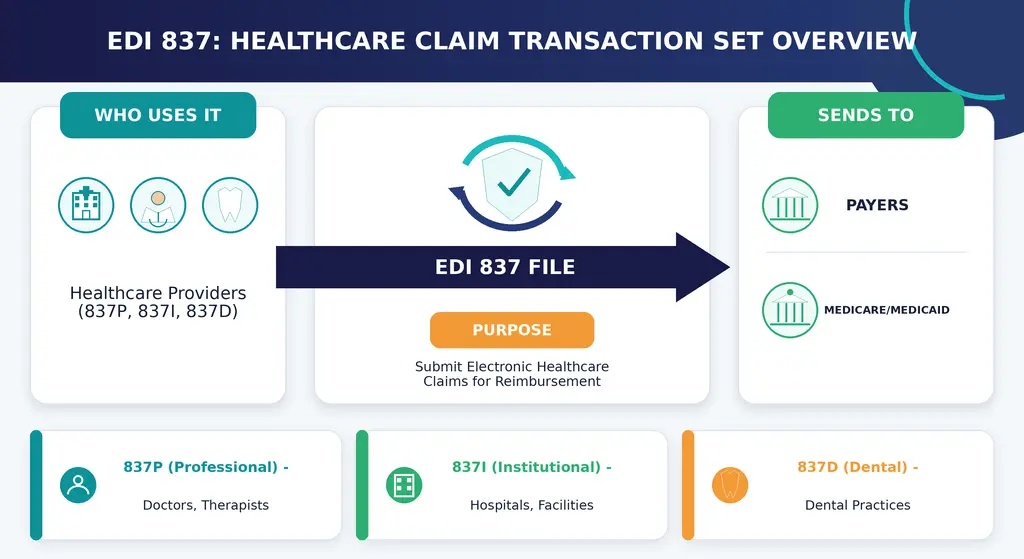
An EDI 837 is the HIPAA-standard electronic transaction used to send professional, institutional, or dental healthcare claim information from a provider or clearinghouse to a health plan.
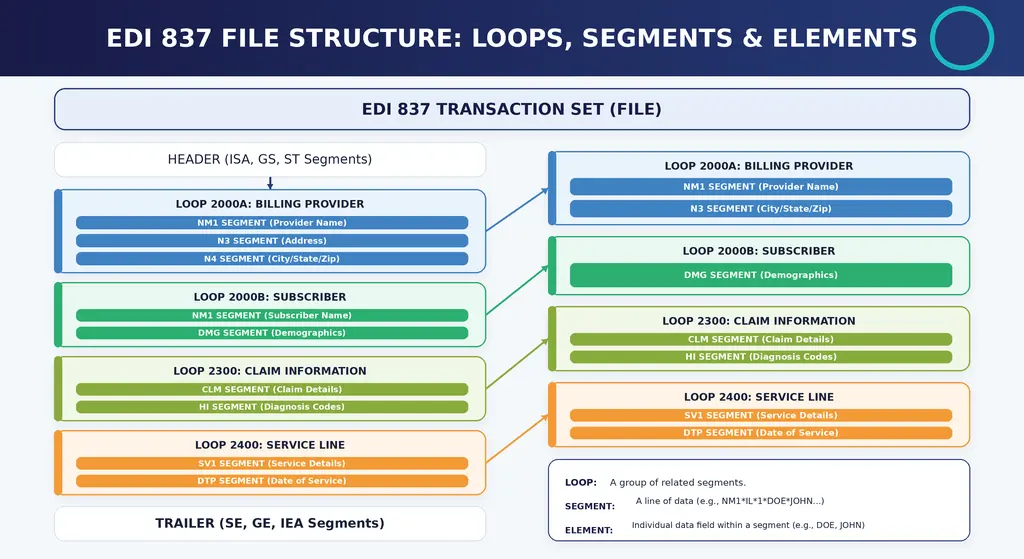
The transaction organizes patient, subscriber, provider, diagnosis, service, and charge information into standardized loops, segments, and data elements. Depending on the claim, the submitter uses the professional 837P, institutional 837I, or dental 837D format.
An 837 is not an electronic image of a CMS-1500, UB-04, or ADA Dental Claim Form. It is a structured transaction file that can contain one or multiple claims. The paper forms remain separate submission formats and may still be used when an applicable payer permits them or a Medicare electronic-submission exception applies.
What This Guide Covers
- About the 3 main 837 transaction types, and when to use them
- What the HIPAA 5010 format specs are and what it takes to comply
- How to implement electronic claims submission, and some best practices
- About some common challenges with claims processing, and some solutions that really work
- How to look at ROI considerations and optimization strategies for your revenue cycle management
Understanding EDI 837 Healthcare Claims
The 837 is the adopted X12 transaction used to submit professional, institutional, and dental healthcare claims electronically under HIPAA. It organizes claim data into a standardized structure that healthcare providers, clearinghouses, and health plans can process consistently. Other adopted formats apply to certain transactions, including NCPDP standards for applicable retail pharmacy claims.
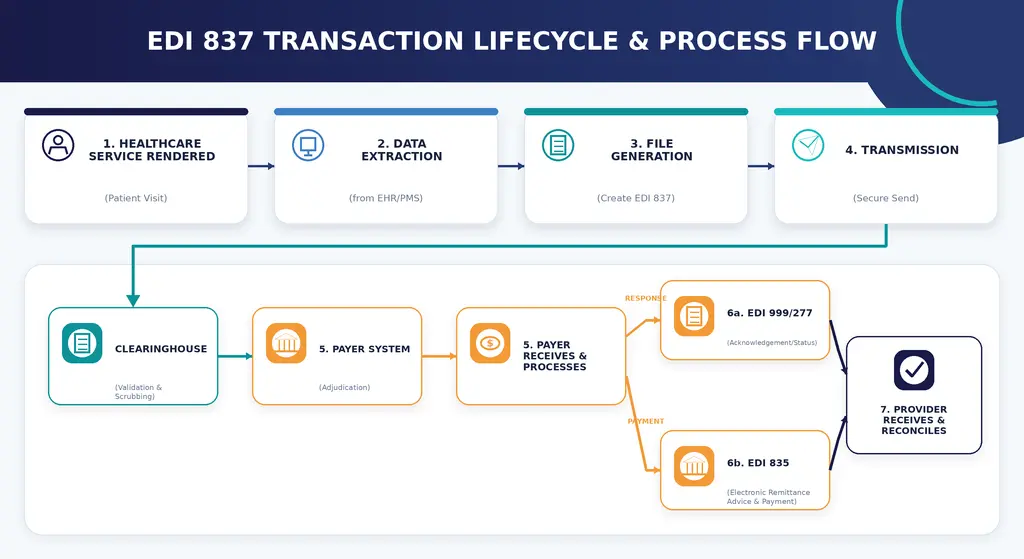
Submitting an 837 begins the electronic claim cycle, but successful transmission does not mean the claim has been adjudicated or paid. A 999 reports whether the file passed X12 syntax and relational checks. A 277CA then reports whether individual claims were accepted, rejected, or forwarded for processing. Accepted claims proceed to payer adjudication, after which the payer may issue an 835 containing payment and remittance information.
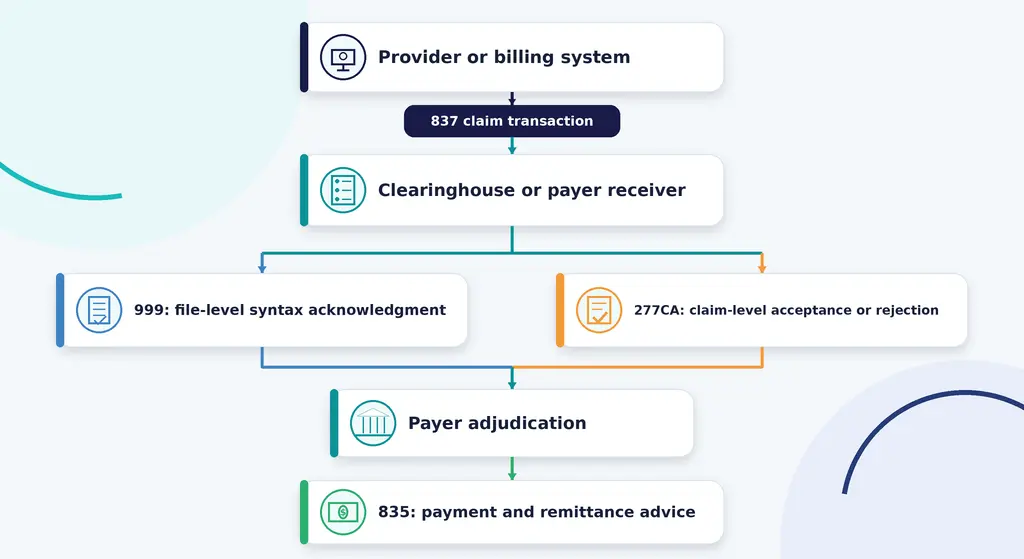
The 999 and 277CA are responses to the submitted 837; they are not payment decisions. A claim can pass the 999 but fail the 277CA, and a claim accepted through the 277CA can still later be denied during adjudication.
837P, 837I and 837D Compared
| Transaction | Used for | Typical submitters | Paper counterpart |
|---|---|---|---|
| 837P: Professional | Professional and supplier claims, including services furnished in offices, homes, facilities, and other settings | Physicians, nonphysician practitioners, therapists, independent laboratories, and eligible suppliers | CMS-1500 |
| 837I: Institutional | Facility claims containing institutional billing information such as type of bill, revenue codes, and admission details | Hospitals, skilled nursing facilities, home health agencies, hospices, and other institutional providers | CMS-1450, also called UB-04 |
| 837D: Dental | Dental claims containing procedure and oral-health claim information | Dentists and qualifying oral-health providers | Current ADA Dental Claim Form |
The place where a service was performed does not by itself determine whether to use 837P or 837I. For example, a physician may submit an 837P for professional services performed in a hospital, while the hospital submits its facility charges through an 837I.
Claims Data Elements
When the EDI 837 is transmitted, it carries structured patient and subscriber data, including names, dates of birth, identifiers, relationship codes, and health-plan information.
Provider info includes NPI numbers, taxonomy codes and billing details. Depending on the transaction and claim, NM1 segments identify billing, rendering, referring, attending, or service-facility providers according to their position within the applicable loop.
Service details cover CPT/HCPCS procedure codes, ICD-10 diagnosis codes, service dates and billed amounts – things like that. In an 837P, the SV1 segment reports professional service-line information, such as the procedure code, charge amount, units of service, and diagnosis pointers.
Standardization allows receiving systems to interpret claim data consistently, but it does not guarantee claim acceptance or payment. The transaction must still meet implementation-guide requirements, payer rules, coverage policies, coding requirements, and medical-necessity criteria.
Simplified 837P Segment Examples
The following fragments show how common professional-claim information may appear in an 837P transaction. These are simplified educational examples, not a complete claim file. A production claim must follow the applicable X12 implementation guide and the receiving payer’s companion guide.
NM1*85*2*DASTIFY MEDICAL*****XX*1234567893~
CLM*PCN12345*150***11:B:1~
HI*ABK:I10~
SV1*HC:99213*150*UN*1***1~
DTP*472*D8*20260828~| Segment | What it communicates |
|---|---|
NM1*85 | Identifies the billing provider. XX indicates that the identifier reported later in the segment is an NPI. |
CLM | Begins the claim information. In this example, PCN12345 is the provider’s patient control number and 150 is the total claim charge. |
11:B:1 | Contains claim-setting information. In this simplified example, 11 is the office place-of-service code and 1 identifies an original claim. |
HI*ABK:I10 | Reports diagnosis information. ABK is the diagnosis qualifier and I10 is the example diagnosis code. |
SV1 | Reports a professional service line. This example includes procedure code 99213, a $150 charge, one unit, and a diagnosis pointer. |
DTP*472 | Reports the service date. 472 identifies the service-date function and D8 indicates one specific date. |
Do not copy these fragments directly into a production claim. Required loops, envelope segments, qualifiers, identifiers, and situational elements depend on the transaction type, implementation guide, payer, and claim circumstances.
EDI 837 Format Specifications and Structure
Building on what we just discussed, this section goes into the technical format requirements that govern how claim file submissions have to be built.
HIPAA 5010 Compliance Requirements
Since 2012, all electronic claims have to be in line with HIPAA 5010. That established the X12 ANSI format where segments have all the necessary data points, separated by tildes (~) with asterisks (*) in between the elements within each segment.
The currently adopted Medicare claim formats include 837P version 005010X222A1 and 837I version 005010X223A2. X12 files use segments, elements, composite elements, loops, and control structures. An asterisk commonly separates elements and a tilde commonly terminates a segment, although delimiters are defined in the interchange envelope.
Examples include HI*ABK:I10~ for diagnosis information and REF*G1*AUTH12345~ for a prior-authorization number when that element is required. Whether a situational element must be reported depends on the implementation guide, the claim facts, and the payer’s companion guide.
The hierarchical structure keeps the context of related elements all connected. A diagnosis belongs to a specific claim (CLM segment), which is tied to a patient (NM1 segment) under a particular provider. And that’s just the sort of thing that can span hundreds of segments per patient claim batch in larger institutions.
Insurance companies and health maintenance organizations make their own EDI 837 requirements by creating companion guides that fill in some of the gaps left out by the standard implementation guides. These documents help to sort out which rules apply in certain situations, lay out specific validation rules and business logic that only apply to specific payers.
Take Medicare and Medicaid for example – they have companion guides that cover specific billing requirements that are different from those of commercial payers. If you’re dealing with one of these payers, you need to take those requirements into account to avoid denied claims.
Claims Clearinghouse Processing
A healthcare clearinghouse can serve as an intermediary between a provider and multiple payers. Depending on the service agreement, it may convert billing-system data into an 837 transaction, validate the file against implementation and payer rules, transmit it to the appropriate receiver, and return acknowledgments and claim responses to the provider.
For healthcare providers without the in-house expertise to handle their own EDI, clearinghouses can offer multi-payer connectivity through just one integration point. They will do the initial validation, forward your claims on to the payers, and even gather up the responses – which makes it a whole lot easier to manage direct connections with dozens of insurance plans.
Some things to keep in mind: maintaining the correct segment hierarchy, filling in all the mandatory fields and adapting to the specific payer requirements spelled out in their companion guides – all these things will directly affect your implementation process
EDI 837 Implementation and Best Practices
Once you have a good grasp on the format specs, you can approach implementation in a methodical way to make the most of the benefits of electronic claims submission.
Implementation Process
Electronic claim submission can reduce manual handling and improve acknowledgment tracking, but results depend on data quality, payer connectivity, claim-edit configuration, and staff follow-up.
- Check your current billing software and EDI capabilities: Take a look at whether your practice management system can handle EDI 837 generation or if you will need a clearinghouse to make it happen. Take a look at where in your workflow manual errors are occurring and identify those gaps.
- Select a clearinghouse or whether to go direct with payers: Decide whether direct submission to major payers or a clearinghouse is the way to go. Consider factors like volume, payer diversity and your in-house technical resources.
- Configure the transaction format for EDI 837 and payer-specific companion guides: Map your internal data fields to the X12 EDI segments using an EDI translator or a clearinghouse mapping tool. Load in the payer-specific rules and requirements for formatting and validation.
- Test your claims submission using some test data and validate everything: Send some test transactions to see if they will be accepted and verify the syntax of your ASC X12, the situational rules and payer requirements. Confirm that the test produces the expected 999 and 277CA responses, and verify that rejected files and claims return to a workable correction queue.
Go live with electronic claims submission and monitor the results – Start submitting live claims while tracking your acceptance rates, reasons for rejection and processing times. Use that data to refine your configurations based on what the payers are telling you.
EDI 837 vs. Paper Claims Comparison
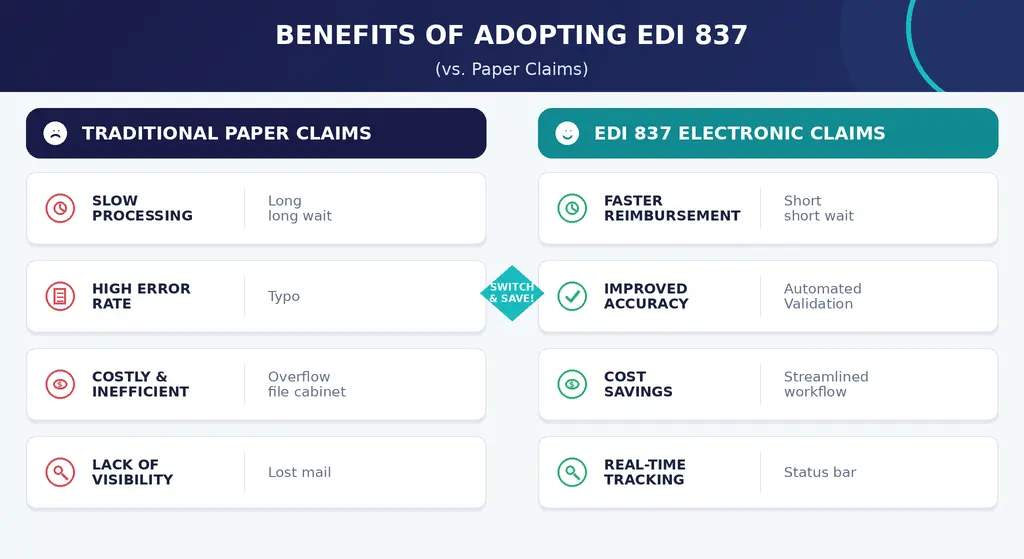
Submitting healthcare claims electronically through the HIPAA-compliant EDI 837 transaction offers significant operational advantages over paper-based claims. According to the 2024 CAQH Index Report, electronic claim submission requires substantially less staff time and lower administrative costs than manual processing.
| Feature | EDI 837 Electronic Claims | Paper-Based Claims |
|---|---|---|
| Cost Per Claim | ~$3.05 per claim | ~$6.33 per claim |
| Administrative Cost | Saves ~$3.28 per claim | Higher administrative cost |
| Efficiency | Automated & standardized | Manual & labor-intensive |
| Claim Tracking | Electronic status tracking | Manual follow-up |
| Payment Processing | Faster claim transmission | Slower manual handling |
| HIPAA Compliance | ASC X12N 837 compliant | Not an EDI transaction |
Cost estimates are industry averages, not guaranteed savings for an individual practice. Actual results depend on claim volume, staffing, technology fees, clearinghouse arrangements, and existing workflow efficiency.
Common EDI 837 Challenges and Solutions
Even though there’s standardization involved, EDI 837 claims processing does present challenges that can affect acceptance rates and payment timelines.
Claims Rejection and Denial Issues
Rejected claims often happen because patient demographics are wrong, or the provider NPIs are invalid, or there are missing prior authorization numbers or diagnosis codes that don’t support the services being billed for. These errors delay payment and make it harder to manage your workload.
Do data validation in real-time as patients are getting services so you can confirm their eligibility and benefits info. Make sure you have accurate provider databases with up to date NPIs & taxonomy codes. Confirm your eligibility checks are getting the coverage details including the required referrals or authorizations.
Payer Companion Guide Compliance
The varying requirements across multiple payers can create a lot of complexity, especially when payers change or update their companion guides without giving a lot of notice.
Use an EDI software that can accommodate rule variations with payer-specific validation. Establish a process to monitor for updates to companion guides from key payers. Consider working with a clearinghouse that manages companion guide compliance as part of their services to take the effort out of it for your internal team.
Claims Processing Delays
Delays happen when claims are incomplete, formatting errors cause rejections or the clearinghouse is bogged down – all these things can cause problems for the patient accounts and your revenue cycle performance.
Do front-end validation to catch errors before submission. Use real-time claims scrubbing to catch missing or invalid data. Consider working with multiple clearinghouses if you’ve got the volume and will justify the redundancy. Monitor your acceptance rates and address those repeated rejection patterns that you’re seeing.
Tackling these challenges will put you in a position to get the full benefits of electronic claims submission.
Conclusion
The 837 is the starting point of the electronic claim cycle, not the complete cycle. Reliable implementation requires the correct transaction type, accurate source data, valid X12 structure, payer-specific companion-guide rules, and active monitoring of 999 and 277CA responses.
Practices should review recurring rejection reasons, confirm that acknowledgments are posted to the correct claims, and reconcile accepted claims with subsequent payer activity and 835 remittance information. An accepted 837 confirms that the claim entered the next processing stage; it does not guarantee coverage or payment.
The 835 carries claim payment and remittance information used for payment posting and adjustment reporting. Electronic funds transfer is a related but separate banking process; receiving an 835 does not by itself mean that funds were transferred through the same transaction.